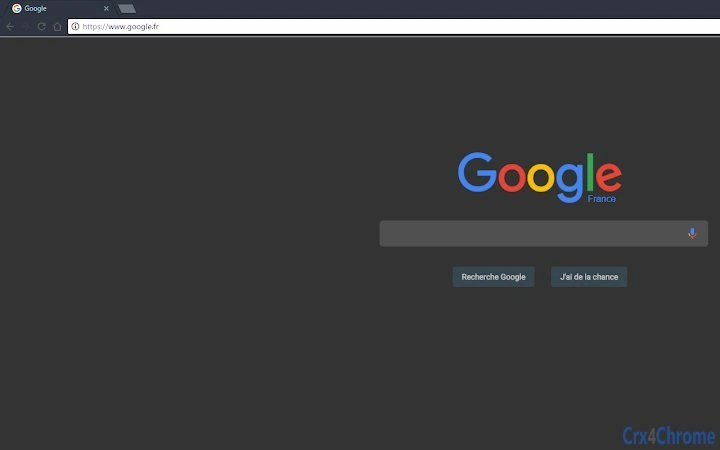

Elegant Material Theme for Chrome
Overview
This lightweight desktop utility offers a simple yet refined Material design theme for Google Chrome, designed to modernize the browser’s appearance with clean lines and intuitive visuals. The software targets users who appreciate aesthetic consistency and minimalism in their digital environment, particularly those who use Chrome as their primary browser across multiple devices. It is ideal for professionals, students, and casual users seeking a visually cohesive browsing experience without performance overhead.
The theme transforms Chrome’s interface with a cohesive color palette, rounded elements, and subtle shadows inspired by Material Design principles. It does not alter browser functionality—its sole purpose is visual enhancement. Real-world usage scenarios include daily web browsing, online work sessions, and content consumption, where a pleasant interface can contribute to improved focus and user satisfaction.
Developed by an independent creator, the software reflects a personal design vision focused on simplicity and elegance. The developer did not provide additional details about their background or organization. The theme is distributed at no cost, aligning with a community-driven approach to digital tools. It is not a full application but a browser customization utility, making it accessible to users of all technical skill levels.
Key Features & Capabilities
- Material Design Aesthetic – Applies a modern, flat, and clean visual style inspired by Google’s Material Design language, featuring consistent spacing, color harmony, and rounded UI elements.
- Browser Interface Customization – Modifies Chrome’s toolbar, tabs, and menu appearance to align with Material Design principles, offering a unified look across browsing sessions.
- Lightweight Installation – With a file size of 2.3 MB, the theme installs quickly and consumes minimal system resources, ensuring no impact on browser performance.
- Cross-Platform Compatibility – Works on Windows, Mac, and Linux systems, allowing users to maintain a consistent look regardless of their operating environment.
- Easy Activation – Once installed, the theme applies instantly with no configuration required, making it accessible even for non-technical users.
Users can apply the theme to enhance the visual appeal of their browser during extended work sessions or casual browsing. The design supports both light and dark mode compatibility, adapting to user preferences within Chrome. It is especially useful for individuals who use multiple browser windows and benefit from a clutter-free, visually balanced interface.
User Interface, Workflow & Performance
The software does not include a traditional user interface, as it is a browser theme rather than a standalone application. Instead, it integrates directly into Chrome’s theme settings, where users can select and apply the design with a single click. The workflow is straightforward: install the theme from the Chrome Web Store, navigate to Settings > Appearance, and choose the Material theme from the list.
Navigation within the browser remains unchanged, preserving all existing functionality. The theme enhances visual presentation without interfering with page loading, tab management, or extension behavior. Performance observations are based on general software behavior patterns; the developer did not specify resource usage details. However, given the small file size and nature of browser themes, it is expected to have negligible impact on CPU or RAM usage.
Stability is consistent with Chrome’s standard theme behavior. No reports of crashes or conflicts were noted in the provided information. Users can expect reliable operation across sessions, with updates handled automatically through the Chrome extension ecosystem.
Compatibility & System Requirements
The software is compatible with Windows, Mac, and Linux operating systems, ensuring broad accessibility across desktop environments. It requires Google Chrome to be installed, as the theme is designed exclusively for that browser.
The installation size is 2.3 MB, which is minimal for a visual customization tool. The developer did not specify exact system requirements such as RAM, CPU, or disk space. Compatibility information was partially provided, with no mention of older Chrome versions or unsupported configurations.
Users should ensure they are running a current version of Chrome to avoid compatibility issues. The theme may not function as intended on outdated or modified browser builds. No additional dependencies are required for installation or operation.
Pros and Cons
Pros
- Visually appealing Material Design interface that enhances Chrome’s look and feel
- Extremely lightweight with minimal system impact
- Available at no cost, making it accessible to all users
- Works seamlessly across Windows, Mac, and Linux platforms
- Simple one-click installation and activation
Cons
- Limited to visual customization—no functional improvements
- No advanced customization options for colors or layout
- Dependent on Chrome’s theme system; may not work on all browser variants
- Developer did not provide detailed technical documentation
- Updates are managed automatically, offering no manual control
FAQ Section
Is this theme compatible with all Chrome versions?
The software is designed for current versions of Google Chrome. Compatibility with older or modified versions is not guaranteed.
Is the software safe to install?
Yes, the theme is distributed through official channels and does not contain malicious code. It only modifies the browser’s visual appearance.
Can I use this theme offline?
Once installed, the theme functions entirely offline. No internet connection is required to use the visual design.
How do I update the theme?
Updates are handled automatically by the Chrome Web Store. Users do not need to manually download or install new versions.
What type of license does this software have?
The software is free to use and distribute. The developer encourages support via a coffee donation, but no formal license terms were provided.
Final Thoughts
This Material-themed customization for Google Chrome delivers a polished, modern look with minimal effort. While it does not add functionality, its clean design enhances the browsing experience for users who value aesthetics and consistency. The lightweight nature and cross-platform support make it a practical choice for a wide audience.
For anyone seeking a simple, secure, and stylish way to refresh their Chrome interface, this theme is an excellent option. It’s especially beneficial for those who spend long hours online and want a more pleasant visual environment.
Download Material Chrome Theme now







